
Content
What is TRON
TRON is a public blockchain founded by Justin Sun in 2017. Its goal is to provide a high-throughput, low-cost decentralized infrastructure that allows anyone to freely transfer, own, and manage digital assets. TRON is widely used for stablecoin transfers and payments around the world, especially for USDT, which has become a popular choice for cross-border and everyday transactions due to its fast speed and low fees.
TRON uses a delegated Proof of Stake–based consensus model and features a mature smart contract architecture, resulting in a highly active network. It supports various Web3 applications such as DeFi, NFTs, and GameFi. Its native token, TRX, is used for transaction fees, resource consumption, governance voting, and participating in network operations, making it the core asset of the entire ecosystem.
What is TRON (TRX) Staking
TRX staking is a way for TRX holders to participate in the security and operation of the TRON network. By locking TRX into TRON’s staking mechanism (referred to as Freeze in TRON), users receive voting power, which they can delegate to validators. In the TRON ecosystem, validators are commonly known as Super Representatives or nodes, and they are responsible for verifying transactions and maintaining the blockchain.
Stakers earn rewards for contributing to network security and governance. This mechanism allows TRX holders to receive steady returns while retaining full ownership of their assets. The process is simple, requires no minimum barrier, and is one of the most common ways to participate in the TRON ecosystem.
Why Stake TRX with CoolWallet
Supported Products
✅ CoolWallet Pro
✅ CoolWallet Go
✅ CoolWallet HOT (hot wallet)
Benefits of Staking TRX with CoolWallet
Stake TRX with CoolWallet to enjoy stable rewards while keeping your assets safe and easily accessible!
Self-custody security
CoolWallet is a self-custody wallet that gives you full control of your assets without relying on any centralized intermediary.High-level protection
With CoolWallet Pro or CoolWallet Go, your private keys are stored securely inside the card’s chipset, eliminating exposure risks and ensuring your funds stay safe.Mobile convenience
Through the CoolWallet App, you can easily stake, unstake, and check your TRX anytime, anywhere. Fast, simple, and intuitive.Full transparency
Monitor your staking progress and accumulated rewards in real time.Flexible Reward Management
You can claim and manage your staking rewards anytime, allowing you to control your earning rhythm with ease.
Instructions
Staking Guidelines
Amount-based staking
With CoolWallet’s TRX staking mechanism, rewards are calculated based on the amount of TRX you stake. The more you stake, the higher the rewards you can receive.
Rewards are based on the total TRX staked under the same address
If you already have TRX staked on a specific address and add more stake using the same address, the newly added TRX will automatically merge with your existing stake and be calculated together for rewards.
Rewards start after Freeze and Vote are completed
To add a new stake, you must first Freeze your TRX and then complete a Vote transaction to delegate your vote to a validator. Rewards will begin accumulating only after the Vote transaction is confirmed.
If your address already has staked TRX, once you add new stake and complete the Vote transaction, all TRX staked under that address will automatically be delegated to the validator you selected most recently, regardless of your previous choice.
Rewards must be claimed manually
Staking rewards need to be claimed manually. Once claimed, the rewards will be sent back to your TRX address but will not be automatically added to your stake. If you want the rewards to continue generating yield, you must manually restake them.
How Rewards Are Calculated
Rewards are based on the total amount of TRX currently staked under your address. By claiming rewards regularly and manually restaking them, you can compound your returns over time
Unstaking Requires a 14-Day Waiting Period
To unstake, you must first submit an Unfreeze transaction. After that, a 14-day waiting period begins. Once the waiting period ends, you need to manually Withdraw your staked TRX to complete the unstaking process.
From the moment the Unfreeze transaction is confirmed, the unstaked TRX will no longer accumulate staking rewards.
How to Start Staking
Step 1. Open the CoolWallet App → Wallet → Earn → TRX to access the TRX Manage Stakes page.

Step 2. Tap Stake, enter the amount of TRX you want to stake, and tap Continue to proceed.
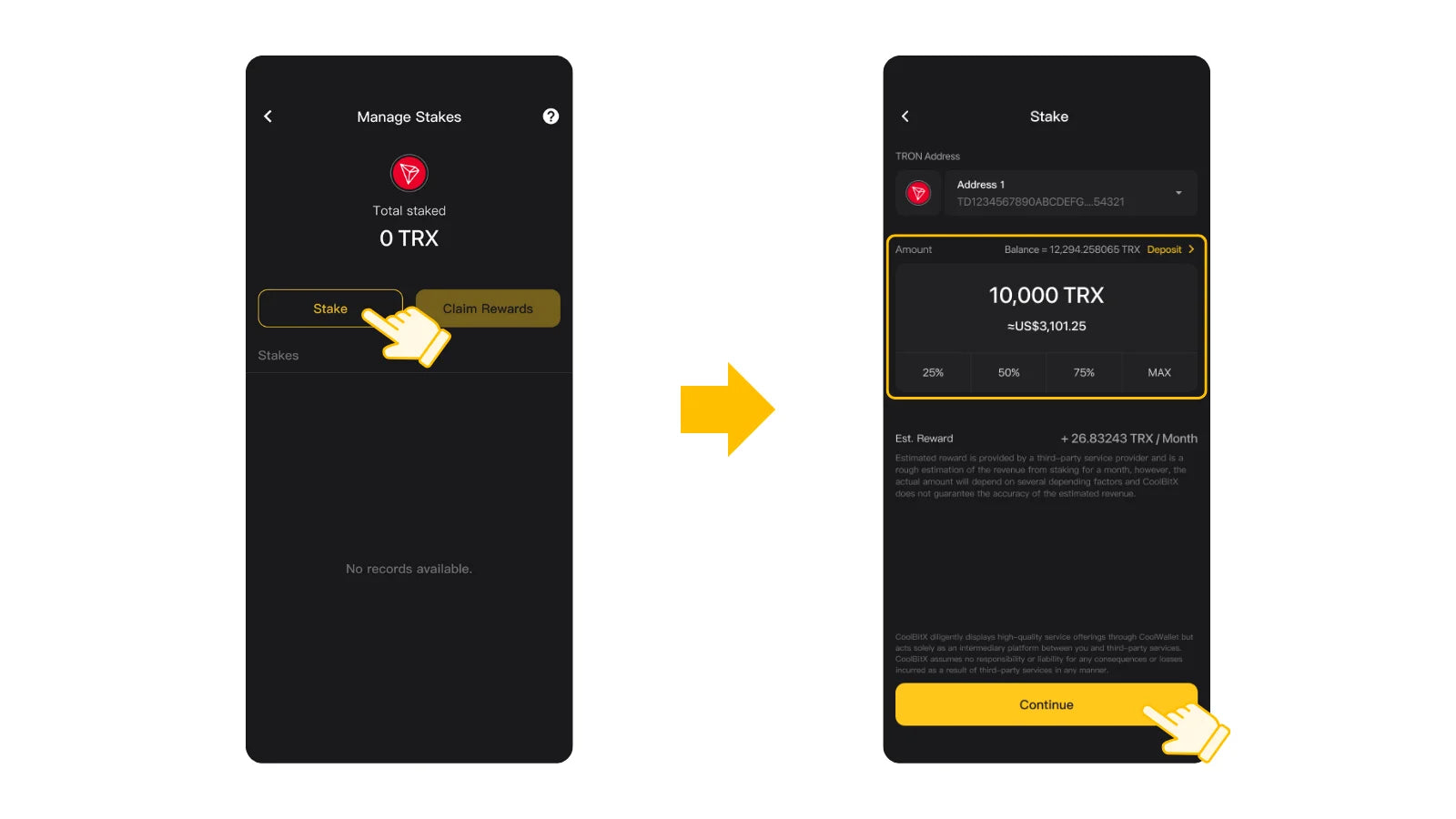
Step 3. Review the transaction details carefully, then verify the transaction. (CoolWallet Pro or CoolWallet Go users will need to have their cold wallet card ready to sign).

Step 4. After the transaction (Freeze) is verified, your TRX will be securely locked on-chain. You will then proceed with a second transaction to vote for a validator.

Step 5. Return to the TRX Manage Stakes page, tap “Action pending, click here to proceed.” and select a validator.

Step 6. Review the transaction details carefully, then verify the transaction. (CoolWallet Pro or CoolWallet Go users will need to have their cold wallet card ready to sign).

Step 7. Once the verification (Vote) is completed, your staking rewards will begin to accumulate.

How to Check Staking Status and and Increase Staked Amount
Once staking is successful and rewards begin accumulating, you can view your total accumulated rewards under the Earn tab on the Wallet page.

If you want to increase your staked amount, simply repeat the steps in How to Start Staking. After completing the new Vote transaction, all TRX staked under the same address will automatically be delegated to the validator you selected most recently, regardless of your previous choice.

How to Claim Staking Rewards
Step 1. On the Manage Stakes page, tap Claim Rewards, then select the address you want to use to pay the network fee.

Step 2. Review the transaction details carefully, then verify the transaction. (CoolWallet Pro or CoolWallet Go users will need to have their cold wallet card ready to sign).

Step 3. After the reward is successfully claimed, your accumulated rewards will reset close to zero. If you regularly claim your rewards and manually restake them, you can compound your returns over time.
According to TRON’s rules, rewards can be claimed once every 24 hours, and claiming rewards does not affect or remove your existing stake.

How to Unstake
Step 1. On the Manage Stakes page, tap Request Unstaking, and select the staking position you want to unlock.

Step 2. Review the transaction details carefully, then verify the transaction. (CoolWallet Pro or CoolWallet Go users will need to have their cold wallet card ready to sign).

Step 3. After the transaction (Unfreeze) is confirmed, a 14-day waiting period begins. During this time, the TRX cannot be transferred or used, and it will no longer accumulate staking rewards.

Step 4. Once the waiting period ends, the staking status will update to “Unlocked, please tap to retrieve your asset”, tap here to retrieve assets.

Step 5. Review the transaction details carefully, then verify the transaction. (CoolWallet Pro or CoolWallet Go users will need to have their cold wallet card ready to sign).

Step 6. After the transaction (Withdraw) is confirmed, the staking record will be removed from the Manage Stakes page.

FAQs
Q1: Can I transfer ADA while staking?
Yes. No. Staked TRX is locked and cannot be transferred, traded, or used. Any unstaked TRX in your wallet can still be freely sent or received.
Q2: What is the minimum amount required to stake TRX?
TRON does not enforce a minimum staking amount, but it is recommended to keep some TRX available to pay necessary network fees.
Q3: What transactions are required to successfully add a new stake?
You must complete two on-chain transactions:
Rewards begin accumulating only after both transactions are completed.
Q4: Can I unstake TRX at any time?
Yes. However, after initiating unstaking, you must wait 14 days before you can withdraw your principal. During this waiting period, the TRX cannot be used and will no longer earn rewards.
Q5: How do I successfully unstake and withdraw my TRX?
Unstaking requires two steps:
Submit an Unfreeze transaction
Wait 14 days, then complete a Withdraw transaction
From the moment the Unfreeze transaction is confirmed, that TRX will stop generating staking rewards.
Q6: Can I transfer TRX during the 14-day waiting period?
No. During the waiting period, the TRX is in an unfreezing state and cannot be transferred or staked.
Q7: What happens if I don’t withdraw my TRX immediately after the 14-day period?
Your TRX will not disappear. It will remain in an “Unlocked” state until you manually withdraw it.
Q8: Do I need to claim rewards manually?
Yes. Rewards must be claimed manually and will be sent back to your TRX address. They are not automatically added to your stake.
According to TRON’s rules, rewards can be claimed once every 24 hours. Claiming rewards does not affect or remove your existing stake, but each claim requires a small amount of TRX for network fees.
If you regularly claim and restake your rewards, you can compound your returns over time.
Q9: Which validator can I delegate to?
TRX staking on CoolWallet currently delegates to Kiln, a trusted validator provider known for secure and reliable node operations.
Q10. Is there any risk in staking TRX?
Under TRON’s staking rules, your staked principal will not be slashed due to validator behavior. However, poor validator performance may result in reduced or delayed rewards. Kiln, CoolWallet’s staking partner, has maintained a zero-slashing record since its node operations began.
www.coolwallet.io (Article Sourced Website)
#Stake #TRON #TRX